CPA8out: Status control of up to 8 Arduino outputs by TEXT commands (from PC, PLC...)
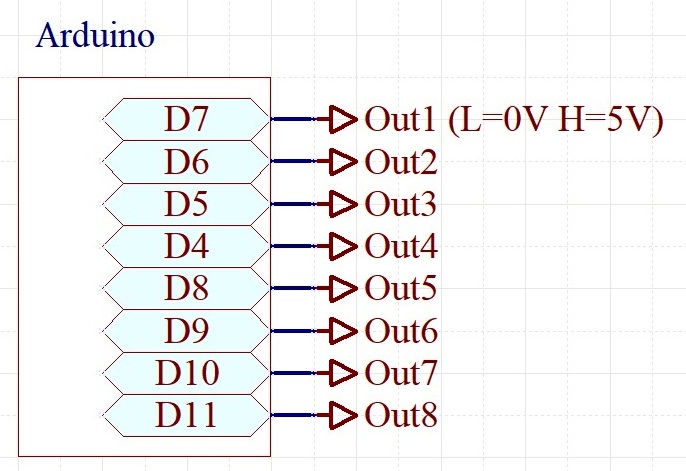
connections (click to enlarge)
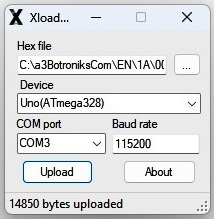
XLoader exsample
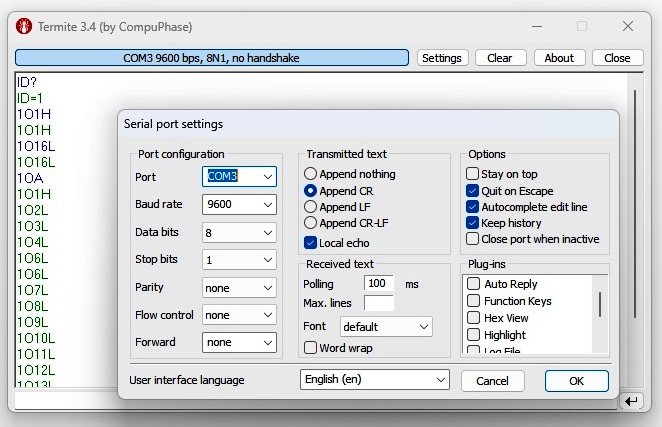


Termite test...
| BotronikS - Final code for all types of Arduino and PC users: -- HOME -- email: botronik@gmail.com |
| What you need to install or have installed before on your PC: see HERE |
CPA8out: Status control of up to 8 Arduino outputs by TEXT commands (from PC, PLC...) |
||||
|
connections (click to enlarge) |
XLoader exsample |
Termite test... |
Useful accessories: | |
| RelayShield1 | ||||
| SSR module: | ||||
| Download the Free! HEX codes below, unpack, and upload to the proper Arduino board (Use a free net tool for example XLoader) | ||||
| 1. ATmega328-16MHz (MINI,NANO,UNO...): Hex-m328 | ||||
| 2. AtMega2560 (Mega(ATMEGA2560)........): Hex-m2560 | ||||
| Based on the offered TEXT commands, you can develop your own PC, PLC ... communication code, and applications... | ||||
| Available ASCII TEXT commands (Default: ID=1 Baud=9600): Test uploaded code using some free serial software such as Termite.TextCommamd format: ID(device identifier) + TextCommand + ENTER |
| IDAT - attention command (return ID&OK) - example for ID=1: 1AT |
| IDOxH - set OUTx (x=1-8) at Hi(5V) level - example for ID=1: 1O1H |
| IDOxL - set OUTx (x=1-8) at Lo(0V) level - example for ID=2: 2O1L |
| IDOA - returns status of all outputs - example for ID=A: AOA |
| IDOAH - set all outputs to Hi level - example for ID=9: 9OAH |
| IDOAL - set all outputs to Lo level - example for ID=0: 0OAH |
| Additional commands (after uploading the code, do next:): |
| Connect Arduino to PC (if in your hardware use RS485 module connected to D0/D1 - Arduino must be out of hardware)- use Termite): |
| ID=device identifier BAUD=device Baud rate |
| ID? - returns ID |
| ID=x (set new ID x=0-9 or A, B, C, D, E, F, - example: ID=2 or ID=A ... ) |
| BAUD=x (set the new baud rate: supported x=1200,2400.4800,9600,19200,38400,57600 - example: BAUD=19200 ) |
| Note: Be careful when changing BAUD! Remember the new set BAUD value in case of further settings! |
| Try and Test with Bot6PcApp: Bot6PcAppV8o - or some of BotPcApp |