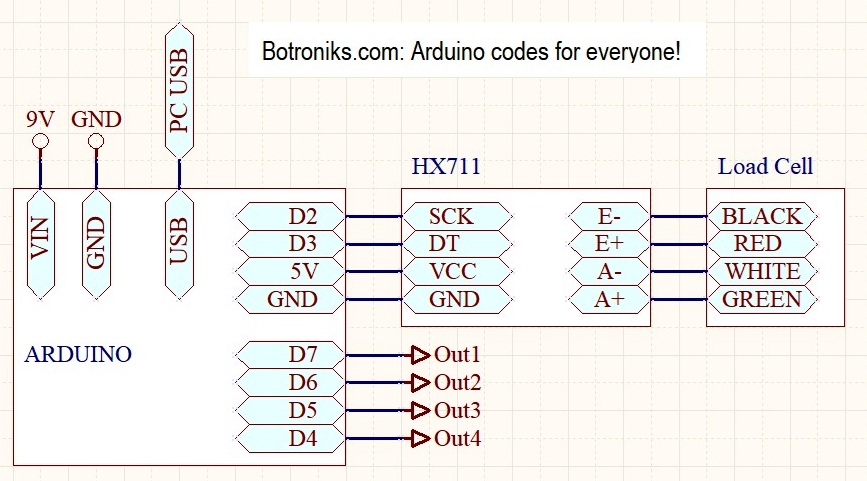
| Electrical note: (Recommendation:Use the following accessories for testing as well as for later use: Lnk1 - Lnk2 ) |
| HX711 pcb - rest of connections: VCC=5V GND=GND - LoadCell: E+=RED E-=BLACK A-=WHITE A+=GREEN |
| Use external power 9-12V for Arduino (VIN). Onlu USB power supplay is not good! |
| Use load cell type Sensitivity 2mV/V. |
| |
| Download the FreeHEX codes below, unpack and upload to the proper Arduino board (Use a free net tool for example XLoader) |
| 1. uc ATmega328-16MHz-5V (NANO,UNO..): Scale2-m328 |
| 2. uc AtMega2560 (Mega (ATMEGA2560)...): Scale2-m2560 |
| |
| You can test the uploaded code using some free serial communication software such as Termite |
| Description of HexCode commands: |
| AT command (ASCII characters) - 9600 Baud ,8 Data bits,None Parity,1 Stop Bit - AT commands must be uppercase, lowercase invalid |
| AT - attention command (returns OK) |
| PV01? - Return proces value 01 (weight-force) |
| Set-Preset commands: Some or all commands use internal Uc EEPROM for memorized when power loss! |
| TARE - Tare function (measured velue = 0) |
| SV01=x (Enter used load cell range x (in KG) - examples: SV01=1(1kg) or SV01=10(10kg) or SV01=100(100kg)... |
| Resolution of showing: X<=1=0,1g(g) - X>1 and <=10=1g(g) - X>10 and <=100=10g(kg) - X>100 and <1000=100g(kg) - X>1000=1kg(T) |
Calibration factor of the scale: Apply TARE command (TARE), put the known weight on the scale (A) and read the measured value (B),
divide A/B and enter it as a corrective value (Cor)=Calibration factor.
Example: A=1000 B=1150 A/B=1000/1150=0.8695 Calibration factor=0.8695 |
| SV02=Cor (scale corrective velue - see above) |
| DRESET - Default Reset ( SV01=10kg SV02=1.000) |
| SV03=x (over x value Out1=ON) |
| SV04=x (over x value Out2=ON) |
| SV05=x (over x value Out3=ON) |
| SV06=x (over x value Out4=ON) |
| Reading Set: |
| SV0x? - return SV0x=XXX (x=1-6) |
| Note: Use only a decimal dot (not a comma!) |
| |
| PC Application(s): |
| PC Application(s) (for WINDOWS): In order for the offered PC applications to work, it is necessary to download and install (only first time): VB6RunTimePlus2.2 |
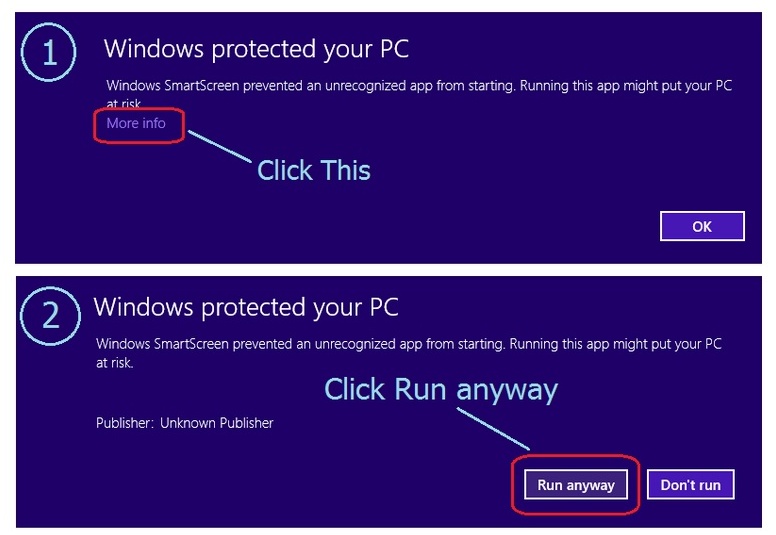
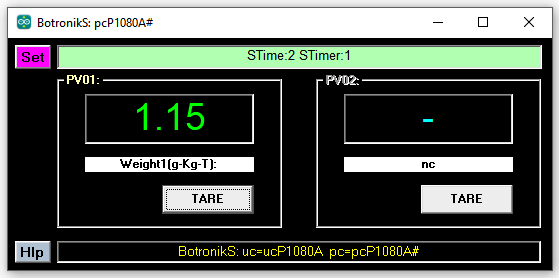
| Download the PC application, unpack and start (allow windows to start applications - how) enter the COM port number where the Arduino is connected and use that. |
| PcApp: Scale2PcApp1 |
| |
 |
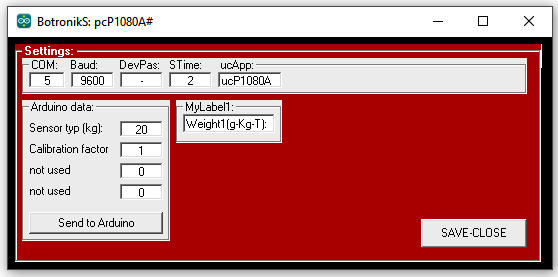 |
| The pictures are orientational. |