| Note: |
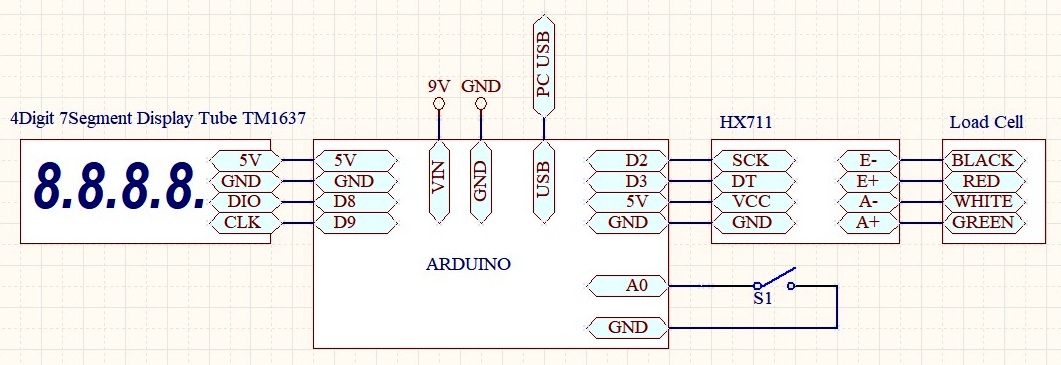
| Use external power 9-12V for Arduino (VIN). Onlu USB power supplay is not good! |
| Use load cell type Sensitivity 2mV/V. Full range of sensor is divided to 10000. Recomended sensors: 1/10/100/1000kg/10T |
| S1=TARE (or TxtPrograming) pushbutton |
| All SVxx values remain memorized in the arduino (EEPROM). Some or all commands use internal EEPROM for memorized when power loss! |
Calibration factor of the scale: Apply TARE command (S1=pushbutton=TARE), put the known weight on the scale (A) and read the measured value (B),
divide A/B and enter it as a corrective value (Cor)=Calibration factor.
Example: A=1000 B=1150 A/B=1000/1150=0.8695 Calibration factor=0.8695 |
| |
| |
| Download the Free! HEX codes below, unpack and upload to the proper Arduino board (Use a free net tool for example XLoader) |
| 1. uc ATmega328-16MHz-5V (NANO,UNO..): LdpScale1-m328 |
| 2. uc AtMega2560 (Mega (ATMEGA2560)...): LdpScale1-m2560 |
| |
| Textual programing mode from PC: |
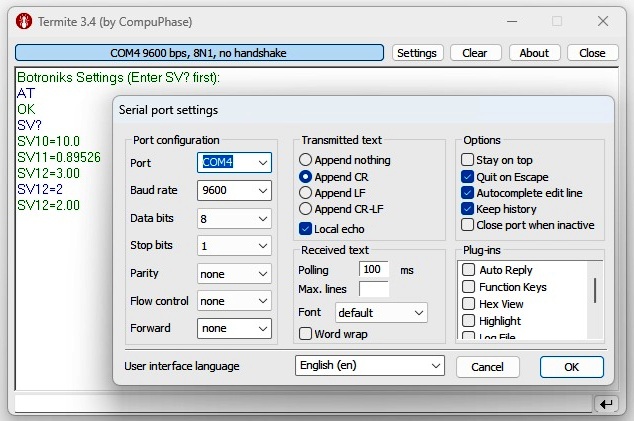
| Connect arduino to PC USB and start some like Termite (select: COM port and Append CR - see picture above) |
| Close S1 (TARE) switch or pushbutton and reset arduino on button. Then apears some text on PC. |
| AT - attention command (returns OK) |
| SV? - return all available SV values |
| SV10=x - no function |
| SV11=x - Calibration factor of the scale (see above) - Exsample: SV11=0.8695 |
| SV12=x - Decimal dot plase of display (0=XXXX 1=X.XXX 2=XX.XX 3=XXX.X) - Example: SV12=3 |
| |
| |
| PC Application(s): |
| PC Application(s) (for WINDOWS): In order for the offered PC applications to work, it is necessary to download and install (only first time): VB6RunTimePlus2.2 |
| Download the PC application, unpack and start (allow windows to start applications - how) enter the COM port number where the Arduino is connected and use that. |
| PcApp: SeeHere - Note: Set: ID=no ID (empty), STime=0 |
| |
| |
| |