TIM41a: Timer - Blinker with 4 outputs and 8 setting times: Impulse1/ Pause1 - Impulse4/Pause4
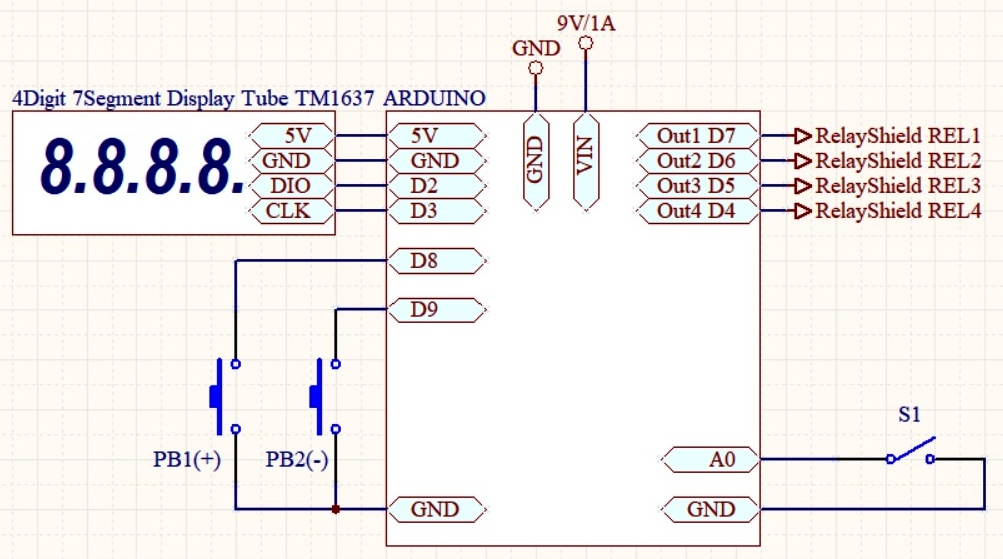
connections (click to enlarge)
| BotronikS - Final code for all types of Arduino and PC users: -- HOME -- email: botronik@gmail.com |
TIM41a: Timer - Blinker with 4 outputs and 8 setting times: Impulse1/ Pause1 - Impulse4/Pause4 |
||
connections (click to enlarge) |
Use accessories: | |
| DisplayTube TM1637 4digit | ||
| RelayShield1-4Rel | ||
| PushButtons | ||
| FREE HexCode! For price of ArduinoIDE soure code please contact us. | ||
| Download the HEX codes below, unpack and upload to the proper Arduino board (Use a free net tool for example XLoader ) | ||
| 1. ATmega328-16MHz (MINI,NANO,UNO...): HexCode-m328 - Free Final! | ||
| 2. AtMega2560 (Mega(ATMEGA2560)........): HexCode-m2560 - Free Final! | ||
| User guide manual: |
| After applying the power (or a reset), the display shows (----) for about 3 sec. During that time: |
| Do action1: DEFAULT settings: Press both buttons (PB1+PB2) and when the screen turns off release. Be sure to do it (only once) after uploading the hex code in Arduino! |
| Do action2: PRESET settings: Press the PB1 button and when the screen turns off release: |
| P10: Display brightness intensity (0-7) |
| P12: S1 mode: 0=as a switch (works while closed) 1=as push button (one cycle only) - try to see difference |
| Additional preset values have no function in this project! |
| SETtings (from "oFF" state only (S1=OPEN)): |
| SET values: Press the PB1 button (until the display goes off then release). The set values that can be changed on the buttons (PB1/PB2=+/-) are displayed. After 2 seconds of inactivity, the value on the display is stored. |
| tX1: Time of ImpulseX (X=1-4 OutX=ON) 0-999,9sec. |
| tX0: Time of PauseX (Out1-4=OFF) 0-999,9sec. |
| Status of outputs: |
| OutX=Active for Time tX1 (X=1-4) |